Calculation with hours in Excel

Last updated on 16/06/2025
Reading time : 3 minutes

This article will explain to you how to calculate with hours in Excel and how to avoid certain errors.

What is an hour in Excel?

Before embarking on calculations with hours, it is imperative to ensure that your cells contain many hours. To check this, simply change the format of your cell to apply a Time format.

If the contents of the cell do not display the hours as you wish (like here, we display 00:00:00 instead of 08:00:00), Go back to this article who will explain the reason to you.
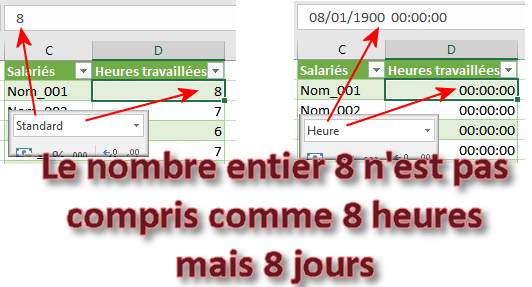
Problem converting integer to hours

From this rule follows a extremely common error in time calculations in Excel. If you add the value 1 to a date, you will necessarily add a day and never 1 hour.

This error is found in this following Excel table. Here, instead of adding hours, the operation adds days to the initial date

Error adding time to a date

How to add hours to a date

This Article lists 3 techniques for correctly adding hours to dates. The first technique is to divide your hours (as a whole number) by 24

Division of values ​​by 24

Or, using the TIME function.

The TIME function to convert integers to hours

Difference over 2 days

The problem with calculating with hours is when there is a difference over 2 days. Indeed, 04:00:00 minus 22:00:00 the previous day, that's 6 hours apart. But to make Excel understand it, you have to include the day in the hour.

Show times beyond 24 hours

Another very simple problem in Excel is when you calculate the sum of time. If the result exceeds 24 hours, Excel will display only part of the information.

For example, Excel will display 1 day and 6 hours instead of displaying 30 hours. But this can be corrected by changing the hour format.

Display of hours beyond 24 hours

Negative time

Displaying negative times in Excel is a real difficulty 🤔 By default, negative times are displayed with ######. But you can get around the problem of two different ways.

Excel displays hashes when hours are negative

Do calculations on tenths, hundredths

Excel is capable of measuring very short times such as tenths, hundredths or thousandths. This example of a sporting competition will show you how to use this precision in your time calculations.

Related Articles

23 Comments

  1. goblin
    16/07/2023 @ 08:22 p.m.

    Hello
    can you tell me the formula for overrun in more or less time?
    example
    I need my 7 hours in cell J4 above the 7 hours in cell K4
    in cell I4 I have 05:30 of work 01:30 is missing from my cell H4 I have 02:00 of travel to complete my 7 hours in cell j4 I take 01:30 in my journeys to fill my cell J4 the remaining 00:30 they go to cell K4 If, on the other hand, I exceed 7 hours in cell I4 the surplus goes
    K4
    please

    Reply

    • Didier Chantriaux
      15/11/2023 @ 09:53 p.m.

      Hello,
      Why do we have to multiply by 24 when we multiply hours in euros?

      Thank you in advance

      Reply

      • Frédéric LE GUEN
        15/11/2023 @ 10:27 p.m.

        “hours in euros?” I admit that I don't understand the question at all.

  2. Lopez Geraldine
    04/07/2023 @ 13:00 p.m.

    Hello,
    I checked in the personalized options to use the calendar since 1904, but my hours are not set to negative, but to 23:00:00.
    Overtime Recovery time Total
    V28/04/23 Replacement Chap 00:30:00 01:15:00
    J25/05/23 Stay one hour 01:15:00 02:30:00
    M30/05/23 dentist 03:00:00 23:30:00
    M13/06/23 dentist 01:30:00 22:00:00
    Wed14/06/23 left at 18:15 p.m. 01:30:00 23:30:00
    J15/06/23 leaves at 14:30 p.m. 00:30:00 00:00:00
    J29/06/23 1 hour more 01:00:00 01:00:00

    My cell format is: [$-F400]h:mm:ss AM/PM

    Thank you in advance

    Reply

  3. Denis
    20/04/2023 @ 14:42 p.m.

    Hello,
    Thank you for this very informative post!
    However, I have not solved my problem which is to obtain in a pivot table, the minimum and the average of a series of times measured in seconds and displayed in the custom format "mm:ss,0".
    The TCD knows how to calculate the average with the desired precision (tenths of a second) while the calculation of the minimum is systematically rounded to the second, without tenths.

    A small example is worth more than a long speech, I am posting a link to the WEBSITE address to download the example Excel sheet from Dropbox.

    Thank you for your lights !
    Denis

    Reply

  4. Annette Gaspard
    29/03/2023 @ 10:17 p.m.

    Hello,
    I'm trying to make a table to add times with hours, minutes, seconds and tenths of a second.
    With the format mm:ss,0 the format is displayed well but the total is not.
    The total in mm:ss;0 format does not display hours if the total exceeds one hour.
    And in hh:mm:ss format it rounds up or down to the minute.
    Is there an hh:mm:ss,0 format please?
    Thank you
    Annette

    Reply

  5. good
    03/10/2022 @ 16:09 p.m.

    hello, I am looking for the formula to make the starting list, knowing that the competition starts at 14 p.m. and that each competitor leaves every 3 minutes, thank you

    Reply

    • Frédéric LE GUEN
      04/10/2022 @ 13:56 p.m.

      We’re preparing an article for you just for that 😉

      Reply

  6. Dominique
    09/08/2022 @ 10:29 p.m.

    Many thanks for the explanations

    Reply

  7. Cyril
    05/05/2021 @ 07:05 p.m.

    Good morning,
    I'm looking for a formula that does the following calculation. Arriving on site at xxhxx, I calculate the departure time knowing that the visit lasts 2h30.
    Well so far it's easy arrival time + 2h30, and I get the departure time. The problem is that if the end of the visit falls between 12 p.m. and 13 p.m., I can't get that to add 30 minutes of meal time to the departure time.

    Thank you in advance for looking into my little problem.

    Bonne journée.
    Cyril.

    Reply

  8. Michelle Mardelli
    23/04/2021 @ 21:48 p.m.

    Hello,
    I would like to know if there is a formula in a table where my employees can write that they worked from 14 p.m. to 15:30 p.m. and that this automatically converts into a total of 1.5 hours.

    Thank you!

    Reply

  9. Patrick hammer
    18/04/2021 @ 11:13 p.m.

    Hello
    How to multiply 27:40 hours by 380 street lights
    Thank you in advance for letting me know the formula.
    Very respectfully
    Patrick Marteau

    Reply

  10. GOOSSENS
    04/03/2021 @ 16:04 p.m.

    Hello,
    For an event that happened 1 day 7 hours and 26 minutes ago, how can I find the date of the event if today is 04/03/2021 and it is 15:48 p.m.?
    Thank you for your reply.

    Reply

  11. Stephanie Perrot
    12/01/2021 @ 18:09 p.m.

    Hello Can you help me I am 100% working time. Service I do 77,17 percent and for another service I do 23 percent can you tell me 23% gives me how many hours to give them thank you in advance

    Reply

  12. Lemercier
    01/12/2020 @ 20:37 p.m.

    Many thanks ! I was stuck on a problem converting decimals into hours, I solved it in a few minutes thanks to your site.

    Reply

  13. mig
    27/10/2020 @ 11:25 p.m.

    Hello, how can I transform 1 hour 01 minutes into 61 minutes?

    Reply

    • bullbz
      27/10/2020 @ 17:40 p.m.

      [m] and concatenate with mns

      Reply

  14. Mouloud OUGUERGOUZ
    19/09/2020 @ 17:31 p.m.

    Hello how do we do for 3740 minutes for example in fact when the number of minutes exceeds 24 hours or even several days
    thank you for your comeback
    Cordial greetings

    Reply

    • Frédéric LE GUEN
      19/09/2020 @ 18:15 p.m.

      Hello, so you already have to make sure that Excel understands 3740 as being minutes (article here). Then, you must apply a special format to display the hours beyond 24 hours

      Reply

  15. Philippe RASIC
    12/05/2019 @ 08:15 p.m.

    Thank you for the clarity of the explanations. The problem is now resolved.

    Reply

  16. Hamid
    15/06/2018 @ 13:45 p.m.

    Great site!!!
    I use Excel for my work and I am constantly looking for tips to improve my files.... and honestly it is the simplest and clearest site in terms of explanations. Well done and keep it up. And again THANK YOU

    Reply

  17. Elena
    08/03/2014 @ 10:13 p.m.

    Your site is so good, keep it up

    Reply

Leave comments

Your email address will not be published. Required fields are marked with *

This site uses Akismet to reduce unwanted. Learn more about how your feedback data is processed.

Microsoft MVP 2024

Newsletter

Once a month:
Tips and quizzes

    We won't spam you. You can unsubscribe at any time.

    Calculation with hours in Excel

    Reading time: 3 minutes
    Last updated on 16/06/2025

    This article will explain to you how to calculate with hours in Excel and how to avoid certain errors.

    What is an hour in Excel?

    Before embarking on calculations with hours, it is imperative to ensure that your cells contain many hours. To check this, simply change the format of your cell to apply a Time format.

    If the contents of the cell do not display the hours as you wish (like here, we display 00:00:00 instead of 08:00:00), Go back to this article who will explain the reason to you.

    Problem converting integer to hours

    From this rule follows a extremely common error in time calculations in Excel. If you add the value 1 to a date, you will necessarily add a day and never 1 hour.

    This error is found in this following Excel table. Here, instead of adding hours, the operation adds days to the initial date

    Error adding time to a date

    How to add hours to a date

    This Article lists 3 techniques for correctly adding hours to dates. The first technique is to divide your hours (as a whole number) by 24

    Division of values ​​by 24

    Or, using the TIME function.

    The TIME function to convert integers to hours

    Difference over 2 days

    The problem with calculating with hours is when there is a difference over 2 days. Indeed, 04:00:00 minus 22:00:00 the previous day, that's 6 hours apart. But to make Excel understand it, you have to include the day in the hour.

    Show times beyond 24 hours

    Another very simple problem in Excel is when you calculate the sum of time. If the result exceeds 24 hours, Excel will display only part of the information.

    For example, Excel will display 1 day and 6 hours instead of displaying 30 hours. But this can be corrected by changing the hour format.

    Display of hours beyond 24 hours

    Negative time

    Displaying negative times in Excel is a real difficulty 🤔 By default, negative times are displayed with ######. But you can get around the problem of two different ways.

    Excel displays hashes when hours are negative

    Do calculations on tenths, hundredths

    Excel is capable of measuring very short times such as tenths, hundredths or thousandths. This example of a sporting competition will show you how to use this precision in your time calculations.

    Related Articles

    Newsletter

    Once a month:
    Tips and quizzes

      We won't spam you. You can unsubscribe at any time.

      23 Comments

      1. goblin
        16/07/2023 @ 08:22 p.m.

        Hello
        can you tell me the formula for overrun in more or less time?
        example
        I need my 7 hours in cell J4 above the 7 hours in cell K4
        in cell I4 I have 05:30 of work 01:30 is missing from my cell H4 I have 02:00 of travel to complete my 7 hours in cell j4 I take 01:30 in my journeys to fill my cell J4 the remaining 00:30 they go to cell K4 If, on the other hand, I exceed 7 hours in cell I4 the surplus goes
        K4
        please

        Reply

        • Didier Chantriaux
          15/11/2023 @ 09:53 p.m.

          Hello,
          Why do we have to multiply by 24 when we multiply hours in euros?

          Thank you in advance

          Reply

          • Frédéric LE GUEN
            15/11/2023 @ 10:27 p.m.

            “hours in euros?” I admit that I don't understand the question at all.

      2. Lopez Geraldine
        04/07/2023 @ 13:00 p.m.

        Hello,
        I checked in the personalized options to use the calendar since 1904, but my hours are not set to negative, but to 23:00:00.
        Overtime Recovery time Total
        V28/04/23 Replacement Chap 00:30:00 01:15:00
        J25/05/23 Stay one hour 01:15:00 02:30:00
        M30/05/23 dentist 03:00:00 23:30:00
        M13/06/23 dentist 01:30:00 22:00:00
        Wed14/06/23 left at 18:15 p.m. 01:30:00 23:30:00
        J15/06/23 leaves at 14:30 p.m. 00:30:00 00:00:00
        J29/06/23 1 hour more 01:00:00 01:00:00

        My cell format is: [$-F400]h:mm:ss AM/PM

        Thank you in advance

        Reply

      3. Denis
        20/04/2023 @ 14:42 p.m.

        Hello,
        Thank you for this very informative post!
        However, I have not solved my problem which is to obtain in a pivot table, the minimum and the average of a series of times measured in seconds and displayed in the custom format "mm:ss,0".
        The TCD knows how to calculate the average with the desired precision (tenths of a second) while the calculation of the minimum is systematically rounded to the second, without tenths.

        A small example is worth more than a long speech, I am posting a link to the WEBSITE address to download the example Excel sheet from Dropbox.

        Thank you for your lights !
        Denis

        Reply

      4. Annette Gaspard
        29/03/2023 @ 10:17 p.m.

        Hello,
        I'm trying to make a table to add times with hours, minutes, seconds and tenths of a second.
        With the format mm:ss,0 the format is displayed well but the total is not.
        The total in mm:ss;0 format does not display hours if the total exceeds one hour.
        And in hh:mm:ss format it rounds up or down to the minute.
        Is there an hh:mm:ss,0 format please?
        Thank you
        Annette

        Reply

      5. good
        03/10/2022 @ 16:09 p.m.

        hello, I am looking for the formula to make the starting list, knowing that the competition starts at 14 p.m. and that each competitor leaves every 3 minutes, thank you

        Reply

        • Frédéric LE GUEN
          04/10/2022 @ 13:56 p.m.

          We’re preparing an article for you just for that 😉

          Reply

      6. Dominique
        09/08/2022 @ 10:29 p.m.

        Many thanks for the explanations

        Reply

      7. Cyril
        05/05/2021 @ 07:05 p.m.

        Good morning,
        I'm looking for a formula that does the following calculation. Arriving on site at xxhxx, I calculate the departure time knowing that the visit lasts 2h30.
        Well so far it's easy arrival time + 2h30, and I get the departure time. The problem is that if the end of the visit falls between 12 p.m. and 13 p.m., I can't get that to add 30 minutes of meal time to the departure time.

        Thank you in advance for looking into my little problem.

        Bonne journée.
        Cyril.

        Reply

      8. Michelle Mardelli
        23/04/2021 @ 21:48 p.m.

        Hello,
        I would like to know if there is a formula in a table where my employees can write that they worked from 14 p.m. to 15:30 p.m. and that this automatically converts into a total of 1.5 hours.

        Thank you!

        Reply

      9. Patrick hammer
        18/04/2021 @ 11:13 p.m.

        Hello
        How to multiply 27:40 hours by 380 street lights
        Thank you in advance for letting me know the formula.
        Very respectfully
        Patrick Marteau

        Reply

      10. GOOSSENS
        04/03/2021 @ 16:04 p.m.

        Hello,
        For an event that happened 1 day 7 hours and 26 minutes ago, how can I find the date of the event if today is 04/03/2021 and it is 15:48 p.m.?
        Thank you for your reply.

        Reply

      11. Stephanie Perrot
        12/01/2021 @ 18:09 p.m.

        Hello Can you help me I am 100% working time. Service I do 77,17 percent and for another service I do 23 percent can you tell me 23% gives me how many hours to give them thank you in advance

        Reply

      12. Lemercier
        01/12/2020 @ 20:37 p.m.

        Many thanks ! I was stuck on a problem converting decimals into hours, I solved it in a few minutes thanks to your site.

        Reply

      13. mig
        27/10/2020 @ 11:25 p.m.

        Hello, how can I transform 1 hour 01 minutes into 61 minutes?

        Reply

        • bullbz
          27/10/2020 @ 17:40 p.m.

          [m] and concatenate with mns

          Reply

      14. Mouloud OUGUERGOUZ
        19/09/2020 @ 17:31 p.m.

        Hello how do we do for 3740 minutes for example in fact when the number of minutes exceeds 24 hours or even several days
        thank you for your comeback
        Cordial greetings

        Reply

        • Frédéric LE GUEN
          19/09/2020 @ 18:15 p.m.

          Hello, so you already have to make sure that Excel understands 3740 as being minutes (article here). Then, you must apply a special format to display the hours beyond 24 hours

          Reply

      15. Philippe RASIC
        12/05/2019 @ 08:15 p.m.

        Thank you for the clarity of the explanations. The problem is now resolved.

        Reply

      16. Hamid
        15/06/2018 @ 13:45 p.m.

        Great site!!!
        I use Excel for my work and I am constantly looking for tips to improve my files.... and honestly it is the simplest and clearest site in terms of explanations. Well done and keep it up. And again THANK YOU

        Reply

      17. Elena
        08/03/2014 @ 10:13 p.m.

        Your site is so good, keep it up

        Reply

      Leave comments

      Your email address will not be published. Required fields are marked with *

      This site uses Akismet to reduce unwanted. Learn more about how your feedback data is processed.